Price changes (mainly increases) mostly don't apply to only one article, but to a large selection like the whole assortment of a supplier or all own products. For managing such a price change for a multiplicity of articles without editing each one manually, the function "Execute price changes" is available.
The function is to be started with clicking on the button 
In the appearing window the following price changes can be done:
- Copy article prices
- Percental increase of sales price 1, sales price 2 and / or purchase price
- Percental reduction of sales price 1, sales price 2 and / or purchase price (enter a minus before the percentage rate)
- Graded Rounding of the sales price 1, sales price 2 and / or purchase price
-
- (mercantile) rounding
- round up to
- round off to
- Restriction of prices to be changed according to the (multiple) suppliers assigned to the items
- Price changes for all shown articles (Selection in table) or all marked articles
Possible values for rounding are
| 0,01 | Round the price to 1 Cent |
| 0,10 | Round the price to full 10 Cent |
| 1,00 | Round the price to full 1 Euro |
| 10,00 | Round the price to full 10 Euro |
| ... | ... |
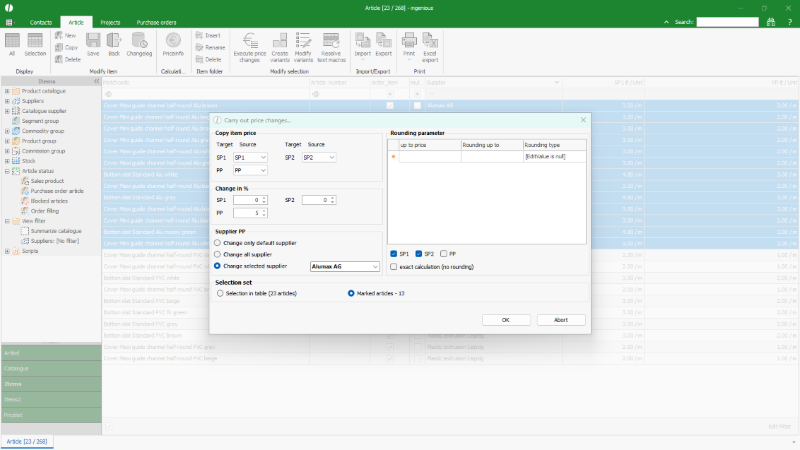
Options for price changes |
After the configuration of the price change is done, it will be started with click on button OK.
After a new confirmation for taking over the changes the prices will be changed.
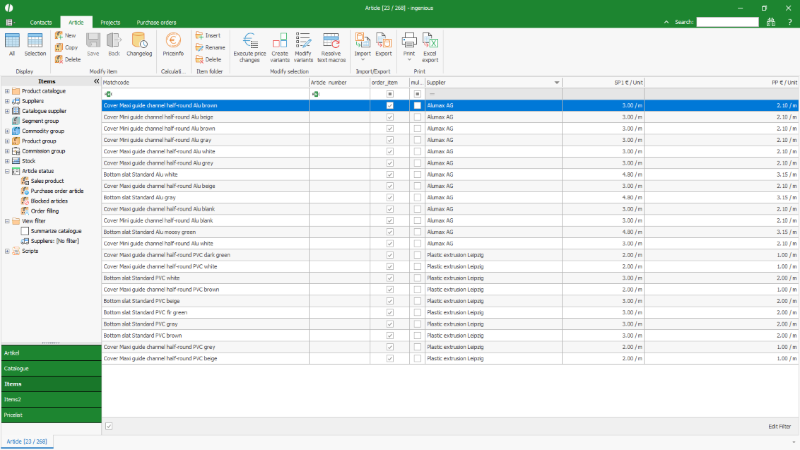
Automatically changed prices |